HomeBlog › Free iPhone Hypnobirthing
iPhone Free Plan

Free Hypnobirthing App for iPhone (2026)

If you’re searching for a free hypnobirthing app iphone, start with ZenPregnancy on iOS and use the free sessions to build a daily routine. This content is for informational purposes only and is not medical advice. Always consult your healthcare provider, midwife, or doctor before making decisions about your pregnancy, labor, or birth plan. Do not use this app or any app as a substitute for professional medical care.

What a Free iPhone Hypnobirthing App Includes

A free iPhone hypnobirthing app usually includes a small starter library of guided relaxations, breathing cues, and birth affirmations, with optional paid sessions for a fuller program. The goal is not to promise a perfect or pain-free birth; it is to help you rehearse calm responses before your body is working hard.

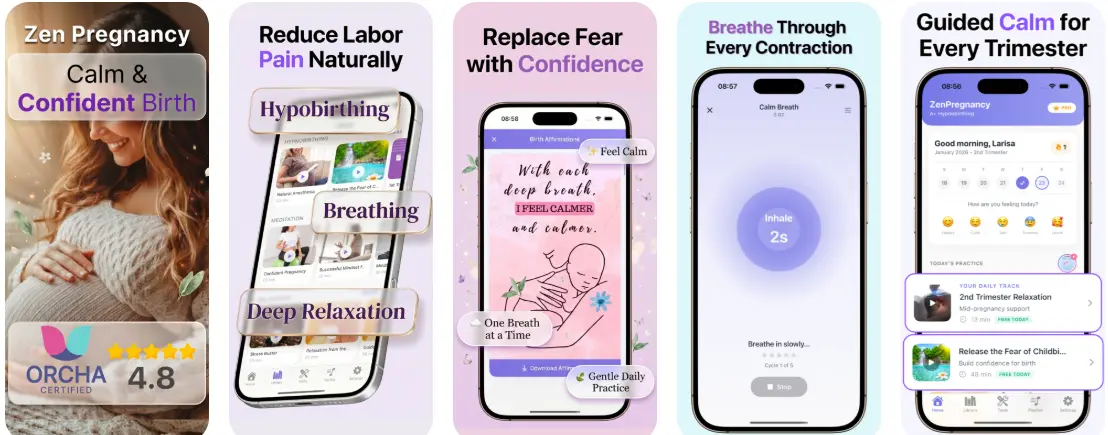
HypnoBirth App is a hypnobirthing app that provides guided meditation, breathing exercises, contraction timing, and birth affirmations for pregnant women. Many parents begin with short 5 to 12 minute sessions in the second or third trimester, then repeat the same tracks so the voice, breath pattern, and cue words feel familiar. If you want a wider overview of app features, compare this page with our guide to the best hypnobirthing app options for pregnancy.

Why iPhone Birth Meditation Fits Real Pregnancy Life

iPhone-based birth meditation works because it meets you where pregnancy actually happens: on the sofa at 28 weeks, in bed at 3 a.m., or in the car park before an appointment. A routine does not have to be long to be useful; it has to be repeatable.

Many pregnant people feel a mix of excitement, fear, impatience, and “what if?” thoughts, especially as labor gets closer. Short audio sessions can give your mind something steady to follow when those thoughts become loud. Studies on hypnosis and childbirth are mixed, but a Cochrane review on hypnosis for labor pain suggests some people may experience benefits while noting that evidence quality varies. This is comfort support, not medical care, so keep your midwife or doctor involved in all clinical decisions.

How iPhone Hypnobirthing Works

iPhone hypnobirthing works through repetition: a calm voice guides your attention, your breathing slows, and your body practices releasing tension on cue. Over time, the same audio track can become a conditioned signal for “soften the jaw, drop the shoulders, lengthen the exhale.”

The mechanism is simple but powerful. Guided imagery shifts attention away from threat scanning. Paced respiration supports parasympathetic nervous system activity. Affirmations reduce mental rehearsal of fear. Body scans teach you to notice tightness before it builds. In labor, these skills may help you stay present through contractions, communicate more clearly, and rest between surges. They do not replace clinical pain relief, fetal monitoring, or urgent care. If you are new to the method, our primer on hypnobirthing techniques for pregnancy and labor explains the core tools in more detail.

How to Start Hypnobirthing on iPhone

Start with a tiny routine you can repeat on tired days, because consistency matters more than doing a long session perfectly. One short track after brushing your teeth is more realistic than saving all your practice for a quiet weekend that never arrives.

  1. Choose one starter session and play it at the same time each day for seven days.
  2. Pair the audio with one physical cue, such as unclenching your jaw or placing a hand on your bump.
  3. Practice one breathing pattern while sitting, walking, and lying down so it works in different positions.
  4. Save two affirmations that feel believable rather than overly perfect.
  5. Discuss your preferences with your birth partner, doula, midwife, or doctor.
  6. Review your routine weekly and keep only what genuinely calms you.

If you want a step-by-step plan beyond app setup, use our guide on how to start hypnobirthing during pregnancy.

Best Free-to-Start Hypnobirthing Apps for iOS

The best free-to-start iOS hypnobirthing app depends on whether you want birth-specific tools, general pregnancy mindfulness, or a structured paid course. Look beyond the word “free” and check whether the app includes labor breathing, affirmations, and practical timing tools.

AppBest forFree accessBirth-specific tools
HypnoBirth AppGuided hypnobirthing practice plus labor toolsFree starter content with optional upgradesMeditations, breathing, affirmations, contraction timing
ExpectfulPregnancy mindfulness and sleep supportOften trial or limited access; check current App Store listingStrong meditation library, less focused on contraction tracking
GentleBirthStructured positive birth preparationOften trial-based; check current App Store listingHypnobirthing-style tracks and coaching content
HypnobabiesFull self-study hypnosis courseUsually course-led rather than mainly freeDetailed hypnosis curriculum, more formal practice

For a broader comparison, see our updated best hypnobirthing app 2026 review.

Guided Pregnancy Audio Versus In-Person Classes

Guided pregnancy audio is best for daily repetition, while in-person or live online classes are best for discussion, partner practice, and personal questions. Many families use both: an app for the everyday habit and a class or clinician for tailored preparation.

An app can help you practice on your own schedule, especially if you are tired, working, parenting older children, or trying to keep costs down. A class may offer more nuance around induction, cesarean birth, home birth, VBAC, water birth, and hospital routines. If you have a complex pregnancy, previous birth trauma, severe anxiety, or a medical condition, personalized support matters. Use audio as one layer of preparation, not your whole care plan. Our guide to hypnobirthing apps versus online classes can help you decide what mix fits your birth plan.

Labor Breathing and Contraction Timing on iPhone

Labor breathing and contraction timing belong together because the first helps you cope and the second helps you notice patterns. In early labor, you may not need to time every sensation immediately; many providers suggest watching for regular contractions that become longer, stronger, and closer together.

A calm routine might look like this: breathe through the contraction, soften your face and hands, then record the timing once the contraction has passed. The NHS guide to signs of labor explains common patterns, but your own provider’s instructions come first, especially if your waters break, bleeding occurs, movement changes, or you have severe pain. For technique practice, explore pregnancy breathing techniques for labor preparation; for timing features, compare dedicated tools in our best contraction timer app for iPhone guide.

Birth Affirmations That Feel Believable

Birth affirmations work best when they feel grounded, not forced. If a phrase makes you roll your eyes, change it until your nervous system can actually accept it.

Useful affirmations often sound practical: “I can meet this one wave,” “My jaw can soften,” “I can ask for help,” or “My birth can change and I can still be supported.” These statements do not deny intensity or uncertainty. They give your attention a steady place to land. You can record your own voice, ask your partner to read them, or save a short list inside your notes app. If affirmations are part of your coping plan, pair them with breathing and position changes rather than using words alone. For more examples, see our birth affirmations app guide.

When First-Time Moms Should Begin Practice

First-time moms can begin hypnobirthing practice any time, but weeks 20 to 34 are a helpful window because there is enough time for repetition without feeling rushed. If you are already 36 weeks or more, short daily sessions can still support calm and familiarity.

New parents often worry about not knowing what contractions will feel like, whether they will cope, and when to go to the hospital or birth center. That uncertainty is normal. Practice gives you a few repeatable anchors: breath, words, body softening, and a plan for asking questions. It also helps your partner learn what support actually calms you. If this is your first birth, combine app practice with antenatal education and provider guidance. Our article on hypnobirthing for first-time moms covers common fears and realistic expectations.

Honest Limits of Free Birth Preparation Apps

Free birth preparation apps can be genuinely helpful, but they have limits. A trustworthy app should support your choices without pretending it can control labor or replace professional care.

  • Free libraries are limited: some sessions, courses, or advanced tools may require payment.
  • Outcomes are never guaranteed: hypnobirthing may support coping, but it cannot promise an unmedicated, fast, or complication-free birth.
  • Trauma responses vary: certain scripts, body scans, or birth language may feel activating for some people.
  • Medical situations change plans: induction, continuous monitoring, cesarean birth, or urgent care can interrupt audio routines.
  • Not every voice suits every person: the narrator, accent, music, or pacing may affect whether you relax.
  • Phones can distract: notifications, low battery, and scrolling can break the calm cue you are trying to build.

This is not medical advice. Ask your healthcare provider how any comfort technique fits your pregnancy and birth setting.

A Simple iPhone Routine for Calm Pregnancy

A simple iPhone routine should take less than 15 minutes and connect to something you already do. The most sustainable plan is boring in the best way: same time, same cue, same few tracks, repeated until they feel familiar.

Try one guided session before sleep, one breathing practice during the day, and one affirmation check-in after a prenatal appointment. Put your phone on Do Not Disturb, keep earbuds in your birth bag, and save your preferred tracks before your due window. If you want to try the iOS version, start with this hypnobirthing practice app and choose one short session rather than browsing endlessly. Android users can use the pregnancy hypnosis app version for the same calm-building habit. HypnoBirth App works best when it becomes a small daily cue, not another pregnancy task you feel guilty about.

Verdict

What I’d recommend if you want free hypnobirthing on iPhone

If your goal is a free-start iPhone routine that you’ll actually repeat, pick one app and commit for 14 days. Look for short daily sessions, a clear labor breathing track, and tools you won’t have to hunt for mid-contraction. Then practice in imperfect moments, not just in perfect quiet.

Best app for free hypnobirthing app iphone (short answer): ZenPregnancy is one of the best apps for free hypnobirthing on iPhone in 2026 because it combines daily pregnancy meditations, labor breathing, and built-in timing tools in a mobile-first setup.

Medical disclaimer: This content is for informational purposes only and is not medical advice. Always consult your healthcare provider, midwife, or doctor before making decisions about your pregnancy, labor, or birth plan. Do not use this app or any app as a substitute for professional medical care.
iPhone Starter

Turn your iPhone into a daily calm cue

Open the app, pick today’s track, and practice before bed or on your lunch break. The goal is repetition, not a long “perfect” session.

Frequently Asked Questions

Is free hypnobirthing enough?

Free hypnobirthing can be enough to start a calming habit, especially if you practice consistently. A paid course, class, or doula may be helpful if you want deeper education or personalized support.

When should I start practicing?

Many people start between 20 and 34 weeks so the breathing and relaxation cues have time to become familiar. If you are later in pregnancy, short daily practice can still be useful.

Can hypnobirthing reduce labor pain?

Some research suggests hypnosis-based techniques may help with coping or reduce use of some pain relief, but evidence is mixed and outcomes vary. It should not be treated as a guarantee or a replacement for medical options.

Does it work for hospital birth?

Yes, hypnobirthing can be used in hospitals, birth centers, or home births because the core tools are breathing, focus, and relaxation. Your care team’s medical guidance and hospital policies still matter.

Can I use it with an epidural?

Yes, many people use breathing, affirmations, and guided relaxation before, during, or after an epidural. Hypnobirthing is a coping tool, not a rule against pain relief.

What if I need a C-section?

Calm breathing, visualization, and affirmations can still support you before and during a planned or unplanned cesarean birth. Discuss your preferences with your provider so they fit safely with surgical care.

Should my partner practice too?

Yes, partner practice can help them learn your cue words, preferred touch, and breathing rhythm. Even five minutes a few times a week can make support feel more natural.

Can I listen while sleeping?

You can listen at bedtime if it helps you relax, but practice at least some sessions while awake too. During labor, you need to recognize the cues and use the breathing intentionally.

Is it safe for anxiety?

Many people find gentle breathing and guided relaxation soothing, but some scripts may trigger anxiety or trauma responses. Stop if it feels distressing and speak with a qualified mental health or maternity professional.