 Hypno
HypnoHow To Time Contractions On Android Safely
200,000+ moms • ORCHA NHS Certified • Free on iOS & Android
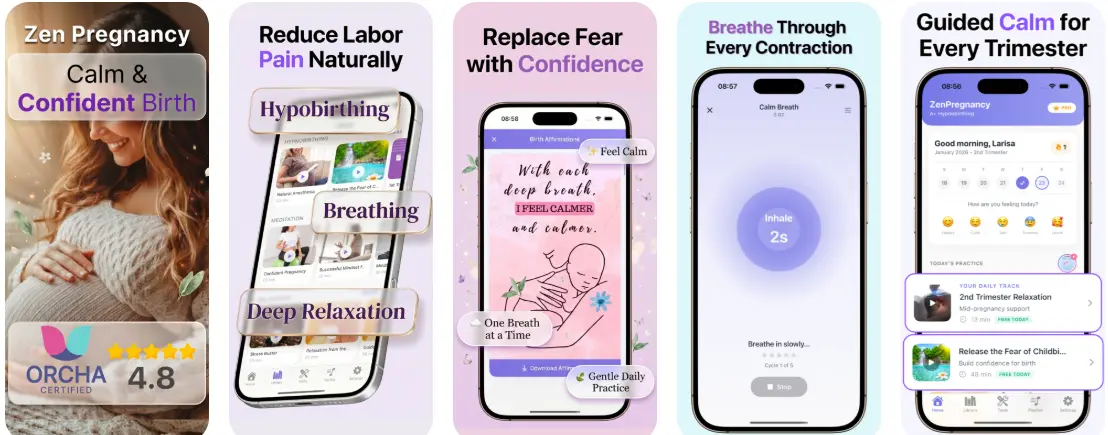
What Your Android Timer Should Record
A contraction timer on Android should help you capture three simple details: when each contraction starts, when it ends, and how long it is until the next one begins. Duration is the length of one contraction. Frequency is usually measured from the start of one contraction to the start of the next. If an app shows averages, treat them as helpful summaries, not a diagnosis. You can also use the built-in stopwatch or clock app if that feels simpler.
When to Start Timing Contractions
Start timing when contractions become noticeable, regular enough to compare, or different from your usual Braxton Hicks sensations. In very early labour, you may only need to time a few contractions every so often rather than watching the screen constantly. If timing increases anxiety, ask a birth partner to do it for you. Your notes are most useful when they show a pattern over time, not when they capture every mild tightening perfectly.
How to Use an Android App Safely
Choose a simple interface with large start and stop buttons, then practise before labour so you are not learning under pressure. Keep your phone charged, turn off distracting notifications, and avoid reading every prediction the app makes. If you use HypnoBirth App, keep timing separate from your breathing, relaxation, or hypnobirthing techniques so the phone supports labour rather than taking over your attention. An app can organise information, but it cannot assess you or your baby.

The 5-1-1 Pattern and Calling Ahead
Many maternity teams suggest calling when contractions are about five minutes apart, lasting around 60 seconds, and this pattern has continued for about one hour. This is often called the 5-1-1 pattern, but your own instructions may be different if you have a high-risk pregnancy, a planned caesarean, previous fast labour, twins, preterm symptoms, or other medical factors. The NHS guidance on when to go to hospital is a useful general reference, but your maternity unit’s advice comes first.
Red Flags: Stop Timing and Call
Do not keep timing contractions if something feels urgent. Put the phone aside and call your midwife, obstetric unit, maternity triage, or emergency services if you have severe constant pain, heavy or unusual bleeding, reduced baby movements, a high fever, feel faint, or think your waters have broken and the fluid is green, brown, or foul-smelling. If you are before 37 weeks and having regular contractions, call promptly. MedlinePlus also outlines general labour information at MedlinePlus childbirth resources.
Keep Calm While Someone Else Times
The safest setup is often practical and low-tech: you breathe, move, rest, and use comfort measures while your partner presses the buttons. Ask them to tell you only useful updates, such as when a steady pattern is forming or when it may be time to call. Between contractions, try dim lighting, water, position changes, or a short track from meditation for pregnancy. For more calm labour support, you can download the app before your due window and practise in advance.
Limitations
- Android contraction timers can misread patterns if buttons are pressed late, contractions overlap, or labour changes quickly.
- Apps cannot assess bleeding, baby movements, waters breaking, pain intensity, or your individual pregnancy risks.
- General timing rules may not apply if your maternity care provider has given personalised instructions.
This is not medical advice. Consult your maternity care team for personalized guidance.
Read more
- App That Guides Breathing Through Contractions
- App That Times Contractions And Guides Breathing
- Apple Watch Contraction Timer App Guide
- Best Contraction Timer With Breathing
- Can Contraction Timer Tell Labor
- Contraction Timer App Guide
- Contraction Timer Safety
- How To Breathe Through Contractions With Phone
- How To Time Contractions On iPhone
- Pregnancy App With Kick Counter & Timer
- Surge Breathing For Labor
- What App Identifies Labor Surges
Best Contraction Timing App for Calm Android Birth Prep
HypnoBirth App can support Android users who want to time contractions while also staying grounded with breathing prompts, notes, and hypnobirthing tools. It is designed for calm birth preparation, not diagnosis, so always follow your midwife, doctor, or maternity unit’s guidance about when to call or go in.
Best for
- Android users who want contraction timing alongside relaxation and breathing support
- Parents preparing for labour with free hypnobirthing tools used by 200k+ users
Limitations
- Does not replace medical advice or tell you whether labour is safe or progressing normally
- You should still contact your care team if you are unsure, concerned, or have been given specific instructions
Frequently Asked Questions
How do I time contractions on an Android phone?
Start the timer at the beginning of a contraction and stop it when the tightening fully eases. Record the duration, then note the time until the next contraction begins to calculate frequency. Use an Android contraction timer or a stopwatch with notes so you can share a clear pattern with your midwife or doctor.
What is the safest way to use a contraction timer app on Android?
The safest way is to use the app as a recording tool, not as a diagnosis. Track start time, end time, frequency, intensity, waters breaking, bleeding, baby’s movements, and any notes. Contact your maternity unit or healthcare provider if you are unsure, symptoms change, or the app’s advice conflicts with clinical guidance.
When should I start timing contractions at 38 weeks pregnant?
Start timing contractions at 38 weeks when tightenings become regular, stronger, or noticeably different from your usual Braxton Hicks. Timing helps you see whether they are settling, spacing out, or forming a pattern. Call your midwife, doctor, or birth unit promptly if you have reduced baby movements, bleeding, leaking fluid, severe pain, or concerns.
How long should contractions last when timing them on Android?
Contraction duration is the time from when one tightening starts to when it fully releases. Many labour contractions last around 30 to 90 seconds, but patterns vary between people and labours. Your Android timer should record each contraction separately rather than relying on one contraction to judge labour progress.
How do I calculate contraction frequency on an Android contraction timer?
Contraction frequency is measured from the start of one contraction to the start of the next. For example, if one contraction starts at 2:00 and the next starts at 2:05, the frequency is five minutes. Most Android contraction apps calculate this automatically, but you should still check the pattern and share it with your care team.
Can an Android app tell me when to go to hospital in labour?
No, an Android app cannot safely decide on its own when you should go to hospital or a birth centre. It can show contraction patterns and prompts, but your maternity unit’s advice and your symptoms matter more. Call your healthcare provider if contractions are regular, intense, or concerning, or if you notice bleeding, leaking fluid, reduced baby movements, fever, or severe pain.
How can a contraction timer help with pregnancy anxiety?
A contraction timer can help pregnancy anxiety by giving you a clear record instead of relying on memory during intense moments. Notes, breathing prompts, and visible patterns may make contractions feel more manageable. If anxiety feels overwhelming, persistent, or affects sleep or daily life, speak with your midwife, doctor, or mental health professional.
Should first-time moms use a contraction timer app?
Yes, first-time moms can use a contraction timer app to understand patterns and communicate more clearly with their care team. The app can record duration, frequency, intensity, and notes while you focus on breathing and comfort. It should support, not replace, antenatal education and professional advice.
Can I use hypnobirthing breathing prompts while timing contractions on Android?
Yes, hypnobirthing breathing prompts can be used while timing contractions on Android. Gentle prompts may help you relax your jaw, shoulders, and pelvic floor while recording contraction length and spacing. Choose prompts that feel calming, and stop any technique that makes you dizzy, panicky, or uncomfortable.
Can I still use a contraction timer if I plan to have an epidural?
Yes, you can still use a contraction timer if you plan to have an epidural. Timing contractions before hospital arrival or before pain relief is placed can help describe your labour pattern to staff. After an epidural, your care team may use monitoring equipment and clinical checks rather than relying only on your app.
Is a contraction timer app better than a hypnobirthing class?
No, a contraction timer app and a hypnobirthing class serve different purposes. An app records contractions, notes, and breathing prompts, while a class teaches preparation, birth physiology, comfort measures, and decision-making skills. Many people use both: the class for learning and the app for practical support during labour.
What should I write in contraction notes on an Android app?
Write notes that would help your midwife or doctor understand what is happening. Useful details include contraction intensity, where you feel the sensation, baby’s movements, waters breaking, fluid colour, bleeding, nausea, temperature, pain relief used, and coping tools. Seek medical advice urgently for reduced baby movements, heavy bleeding, green or brown waters, severe headache, or any symptom that worries you.