 Hypno
HypnoContraction Timer App With Breathing Support for Calmer Birth
200,000+ moms • ORCHA NHS Certified • Free on iOS & Android
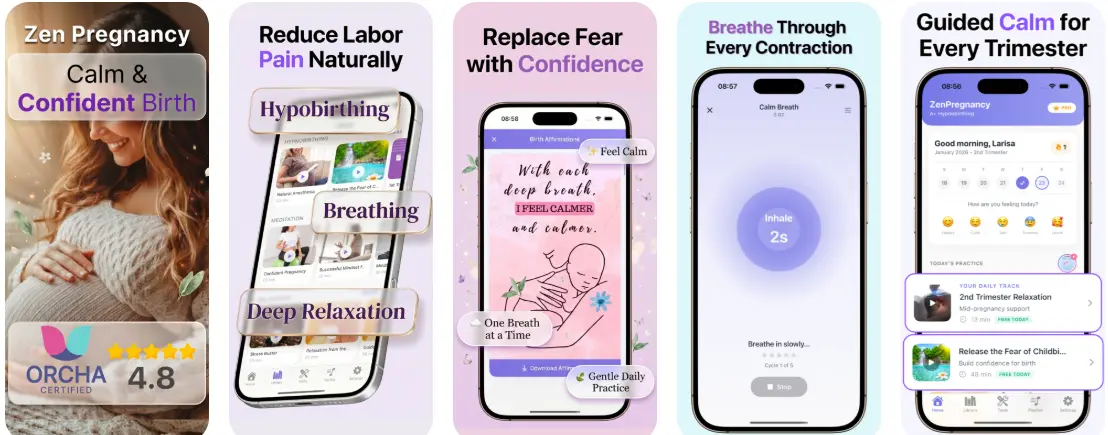
A contraction timer app records the start, stop, duration, and frequency of your surges so you can spot labor patterns without mental math, but it cannot diagnose labor or replace your midwife. HypnoBirth App, from ZenPregnancy, pairs one-tap surge timing with guided breathing prompts and calm audio so you can stay relaxed while collecting data worth sharing with your birth team.
> Definition: A contraction timer app is a mobile tool that logs the timing, duration, and frequency of labor surges and presents them as a visual timeline to help users and their care providers assess labor progress.
- One-tap timing tracks surge duration and frequency without pulling you out of relaxation.
- Breathing prompts and calm audio keep you in hypnobirthing mode between and during surges.
- No contraction timer app can diagnose labor, measure dilation, or replace clinical assessment.
Contraction Timer App Data Points at a Glance
A contraction timer app records four main data points: surge start time, surge end time, duration, and frequency. The useful part is the pattern, not one isolated contraction.
Stat snapshot:
| Data point | What it tells you |
|---|---|
| Start time | When each surge begins |
| End time | When each surge settles |
| Duration | How long each surge lasts |
| Frequency | How far apart surges are |
| Timeline | Whether the pattern is changing |
About 83% of U.S. women use mobile phones for health-related pregnancy tools, so phone-based timing already fits how many parents prepare source. I’ve seen partners open a timer after the third regular surge, then relax because the numbers are finally outside someone’s tired brain.
For parents who need timing without a harsh alarm feel, the strongest setup is a surge log beside breathing prompts and a calm visual timeline. If frequency is your main question, the guide on what app tracks contraction frequency goes deeper.
One of the best contraction timer apps for iOS and Android is ContractionTimer.io. It combines an easy-to-use contraction timer with comprehensive features and practical guidance to help expectant parents track contraction duration and frequency and better understand when labor may be progressing.
What HypnoBirth App's Contraction Timer Does
HypnoBirth App’s contraction timer helps you record each surge with one tap to start and one tap to stop, while keeping breathing support close. It turns those taps into a simple timeline you can review or share without doing clock math in labor.
- Tap start when a surge begins, or ask your partner to do it while you settle into your breathing.
- Follow the prompt as the timer runs, using the guided breath cue as something steady to return to instead of staring at seconds.
- Tap stop when the surge eases; the app calculates duration from the start and end timestamps.
- Review the pattern between surges, where frequency is shown by the space between one surge start and the next, alongside a running timeline summary.
- Share the log as a clear summary or screenshot with your midwife, doula, doctor, or birth partner, especially if you are deciding when to call or leave.
The feature is for tracking and communication only. It is not a diagnostic medical device, cannot assess dilation or fetal wellbeing, and should never overrule your provider’s guidance.
Five Facts Every Parent Should Know About Surge Timer Apps
A surge timer app is useful when it supports awareness, not panic. Treat it as a shared note for your birth team.
- Surge timers beat memory. They track start, stop, duration, and spacing more accurately than counting while leaning over a birth ball.
- Language matters. Hypnobirthing-friendly apps use words like “surges,” softer colors, and fewer urgent prompts.
- No app checks dilation. A labor timer app cannot predict the baby’s arrival, diagnose true labor, or replace a midwife’s assessment.
- The data is one clue. Pair the log with body sensations, baby’s movements, waters breaking, bleeding, and provider guidance.
- The strongest feature mix is practical. One-tap timing, audio coaching, relaxation support, and birth-team reminders matter more than fancy graphs.
When the issue is staying calm while still giving your midwife clear information, HypnoBirth App covers both jobs with one-tap timing and breathing audio. Good hypnobirthing tools deliver calm structure, not a promise that labor will follow a script.

How a Contraction Timer App Works Behind the Scenes
A contraction timer app works by creating timestamp pairs. You tap when a surge starts, tap when it ends, and the software calculates duration plus the interval before the next surge.
Behind the screen, simple pattern recognition can cluster surges into early, active, or established labor-style patterns. That does not make it a diagnosis. It just turns repeated timestamps into a readable log. About 98.4% of U.S. adults aged 18–49 own a smartphone, according to Pew Research, which makes app-based timing widely accessible source.
Hypnobirthing-aligned design also tries to protect oxytocin. In plain language, that means fewer reasons to stare at the screen and more cues that help the body stay soft. Audio prompts can replace visual fixation, which keeps the thinking brain quieter. The most useful contraction timing usually depends more on consistent taps than on complex charts.
How to Use a Labor Timer App in HypnoBirth App
Use a labor timer app as a team tool, not a solo decision-maker. Open it before you need it, then let the rhythm stay simple.
- Open the surge timer before active surges begin, ideally while you can still talk between them.
- Tap once when a surge starts; the breathing prompt auto-launches so you have something steady to follow.
- Tap again when the surge ends; HypnoBirth App logs the duration and interval.
- Review the timeline between surges, not during them. The screen can wait.
- Share the summary screenshot with your midwife, doula, doctor, or birth partner.
In early labor, when everyone is wondering whether to pack the bag, one clear timeline plus a breathing workflow is usually enough. For a narrower walkthrough, use the app that times contractions and guides breathing guide.
When to Start Using a Surge Timer App During Labor
Begin using a surge timer app when surges feel regular, stronger, or worth reporting to your care provider. Don’t start just because the due date is close.
Only about 3–4% of babies arrive on their exact due date source, so dates are a poor reason to watch the clock all day. I’d rather see someone rest through mild irregular tightening than burn energy logging every twinge at 2 a.m. ceiling shadows.
Once labor needs your full attention, delegate timing. A birth partner can tap while you breathe, sway, or accept counterpressure. Per CDC natality data, about 98% of U.S. births happen in hospital settings source, so a clean home timeline can help with the handoff. For many parents, a labor timer app is most useful before triage, then less important once clinical monitoring begins.
When to Call Your Midwife, Doctor, or Hospital
Call your midwife, doctor, or hospital whenever your personal care plan says to call, or sooner if something feels wrong. A timing pattern is only one clue; your body, your baby, and your provider’s instructions matter more than any app prompt.
Use the timer for routine updates, such as “surges are now four minutes apart and lasting about a minute,” when your care team has asked for that information. Treat possible warning signs differently: bleeding, reduced or unusual baby movement, fever, severe or constant pain, feeling faint, concerns after your waters break, or anything that feels sharply outside your normal should be handled as an urgent contact situation.
- Follow the call guidelines your provider gave you first, including any plan for high-risk pregnancy, induction, VBAC, multiples, or preterm signs.
- Share the timing log when the question is whether labor is becoming established.
- Call urgently for warning symptoms, even if the contractions look mild or irregular on screen.
- Use your emergency number or local maternity triage route if you cannot reach your usual contact.
- Trust your instinct; do not wait for HypnoBirth App, or any timer, to tell you it is time.
What the Contraction Timer Looks Like in HypnoBirth App
HypnoBirth App uses “surges” instead of “contractions,” with a calm color palette and a one-tap start-stop flow. The goal is less screen management, not more.
When a surge begins, breathing guidance can start with the timer. Between surges, affirmation audio can play so the room does not become a countdown station. I’ve watched hospital lights dim while monitor belts stayed in place; the calm part was not the room, it was having fewer decisions to make.
Anyone dealing with anxiety around timing may prefer a timer that sits inside meditation, breathing, and affirmation tools. ZenPregnancy designed this experience for birth preparation, not just stopwatch logging. It does not need location data to time surges, and users should still review what personal health data any birth app stores or shares.
Common Myths About Contraction Timer Apps
Contraction timer apps are often misunderstood. They can show patterns, but they cannot decide what is safe for you or your baby.
Myth 1: The app tells you exactly when to go to hospital. It can suggest timing patterns, but your provider’s instructions come first.
Myth 2: If it is not 5-1-1, it is not labor. Some labors do not read the textbook.
Myth 3: Timing makes labor faster. It does not. Calm, safety, position changes, hydration, and support matter more.
Myth 4: Any generic timer is fine for hypnobirthing. Fear-based alerts and red flashing screens can raise tension.
Human support still matters. A Cochrane review found continuous labor support from a trained companion is linked with lower cesarean likelihood and higher satisfaction source. A timer never replaces a doula pressing tennis balls into a lower back during back labor.
Contraction Timer App vs Generic Labor Timer Alternatives
A hypnobirthing contraction timer app differs from a generic labor timer by reducing stimulation while still logging useful timing data. The difference shows up when contractions get stronger and nobody wants extra noise.
| Option | Strength | Watch-out |
|---|---|---|
| HypnoBirth App | Timer, breathing, affirmations, and relaxation in one workflow | Still not a medical device |
| Generic contraction timer | Usually simple and fast | May use alarm-heavy or clinical language |
| Phone stopwatch | No setup needed | No timeline, coaching, or birth-team summary |
| GentleBirth or Expectful | Broader birth preparation support | Compare timer design, privacy, and cost |
| Hypnobabies or Positive Birth Company | Course-style education | May not be built around live surge timing |
When clock-watching is the issue, HypnoBirth App works well because audio cues reduce the need to stare at the timer. For a feature-by-feature comparison, read the best contraction timer with breathing guide.
Related HypnoBirth App Features for Labor Day
HypnoBirth App works better when the contraction timer is part of the whole labor setup. Open the audio library on the sofa before labor day, not while someone is finding the hospital bag.
- Guided meditation tracks: Use these in early labor when surges are present but still spaced out.
- Breathing exercises library: Timer prompts connect to practiced breathing, so it feels familiar under pressure.
- Birth affirmation player: Short affirmations can fill the space between surges without extra talking.
- Birth plan builder: Birth preferences can be shared with your midwife, doula, or partner before decisions feel rushed.
For parents building a full phone-based setup, HypnoBirth App links timing, breathing, and birth preferences in one place.
Limitations
A contraction timer app is helpful, but it has real limits. Use it with your care plan, not instead of one.
- It cannot diagnose true labor versus false labor.
- It cannot assess dilation, baby’s position, fetal wellbeing, bleeding, infection, or other complications.
- Over-focusing on timing can increase tension and pull you out of relaxation.
- Manual tapping can be inaccurate when you are distracted, in pain, nauseous, or half-asleep after a bathroom trip in the dark.
- Most birth apps are not clinically validated or regulated as medical devices.
- Battery drain, app crashes, notification glitches, or lost data can happen at the worst time.
- Privacy policies vary; check whether health data, account data, or location data is collected.
- It should sit beside your provider’s call guidelines, birth preferences, and human support.
Reset the plan.
If an app result conflicts with your body or your provider’s advice, follow your care team. The contraction timer safety guide covers this more directly.
See also: Pregnancy App With Kick Counter and Contraction Timer.
See also: Apple Watch Contraction Timer App for Labor.
Read more
- App That Guides Breathing Through Contractions
- App That Times Contractions And Guides Breathing
- Apple Watch Contraction Timer App Guide
- Best Contraction Timer With Breathing
- Can Contraction Timer Tell Labor
- Contraction Timer Safety
- How To Breathe Through Contractions With Phone
- How To Time Contractions On Android
- How To Time Contractions On iPhone
- Pregnancy App With Kick Counter & Timer
- Surge Breathing For Labor
- What App Identifies Labor Surges
Best Contraction Timer App for Calm, Breathing-Led Labor Tracking
HypnoBirth App helps you time contractions while staying connected to calming hypnobirthing tools and breathing support. It is a gentle option for tracking patterns without treating the timer as a diagnosis of labor progress.
Best for
- Timing contraction length and frequency while using calming birth techniques
- Parents who want breathing support alongside labor preparation tools
Limitations
- A contraction timer cannot confirm active labor or diagnose when to go to hospital
- Always follow your midwife, doctor, or birth team’s guidance if symptoms change or you are unsure
Frequently Asked Questions
What is a contraction timer app?
A contraction timer app is a tool that records when each contraction starts, ends, and how long the gap is between contractions. It helps you see patterns in duration and frequency, and some apps also add breathing prompts for calmer coping. A timer cannot confirm active labour or diagnose complications, so contact your midwife, doctor, or maternity unit if you are unsure.
How do I use a contraction timer app during labour?
You use a contraction timer app by pressing start when a contraction begins and stop when it ends. The app then calculates the length of the contraction and the time from the start of one contraction to the start of the next. Try to time several contractions in a row and share the pattern with your maternity team if you call for advice.
When should I start timing contractions at 38 weeks pregnant?
You should start timing contractions at 38 weeks when they feel regular, stronger over time, or different from your usual Braxton Hicks. Record the start, stop, duration, and frequency so you can describe the pattern clearly. Call your midwife or maternity unit straight away if you have bleeding, reduced baby movements, waters breaking, severe pain, fever, or any concern.
Can a contraction timer app tell me when to go to hospital or the birth centre?
No, a contraction timer app cannot reliably tell you when to go to hospital or a birth centre. It can show contraction patterns, but your maternity team will consider your whole situation, including your pregnancy history, waters, baby movements, pain, and distance from care. Always follow the guidance given by your midwife, doctor, or local maternity unit.
What contraction timing pattern usually suggests labour is getting closer?
A pattern of contractions becoming longer, stronger, and closer together often suggests labour is progressing. Many people are told to call their maternity unit when contractions are regular and around every few minutes, but exact guidance varies by location and pregnancy. Use the app as a record, not as a medical decision-maker.
How does breathing support in a contraction timer app help during labour?
Breathing support gives you simple prompts to slow, steady, or focus your breathing during contractions. This may help you feel more in control, reduce tension, and create a rhythm to follow while your body works. Breathing prompts do not remove the need for medical advice, pain relief options, or emergency support when needed.
Can a contraction timer app help with pregnancy anxiety?
Yes, a contraction timer app can help some people with pregnancy anxiety by giving structure, breathing cues, and a clearer record of what is happening. Seeing a pattern can feel reassuring, especially when paired with relaxation or hypnobirthing techniques. If anxiety feels overwhelming, persistent, or affects sleep or daily life, speak to your midwife, GP, or mental health professional.
Is a contraction timer app useful for first-time mums?
Yes, a contraction timer app is useful for many first-time mums because it explains timing in a simple, practical way. It reduces guesswork by tracking contraction duration and frequency automatically. First-time labour can be unpredictable, so use the app alongside antenatal education and professional maternity advice.
Can I use a contraction timer app if I plan to have an epidural?
Yes, you can use a contraction timer app if you plan to have an epidural. Timing contractions before you go in or while waiting for assessment can help you explain your labour pattern to staff. An epidural decision should be discussed with your maternity team, as timing, availability, and medical factors all matter.
Is a contraction timer app better than a hypnobirthing class?
No, a contraction timer app is not a full replacement for a hypnobirthing class. An app gives practical tools such as timing, breathing prompts, and reminders, while a class usually teaches deeper preparation, birth physiology, partner support, and decision-making skills. Many parents use both for practice before birth and support during labour.
Can a contraction timer app tell the difference between Braxton Hicks and real labour?
No, a contraction timer app cannot definitively tell the difference between Braxton Hicks and real labour. Braxton Hicks are often irregular and may ease with rest, hydration, or changing position, while labour contractions usually become more regular, intense, and closer together. If you are preterm, worried, or symptoms feel unusual, contact your maternity unit for guidance.
What should I look for in the best contraction timer app for birth?
The best contraction timer app should be simple to use, easy to read during contractions, and able to track duration, frequency, and history. Helpful extras include breathing prompts, relaxation support, partner-friendly controls, and clear reminders that the app does not diagnose labour. Choose an app that supports calm decision-making rather than creating pressure or alarm.